


Safe Surfer: Block Porn & Apps
3.8405.00 Reviews
App Specs
- Version
- 3.9.7
- Updated On
- License
- Free
- Downloads
- 500,000+
- Developer
- Safe Surfer
- Categories
- Parenting
- Platform
- Android, iOS
Screenshots
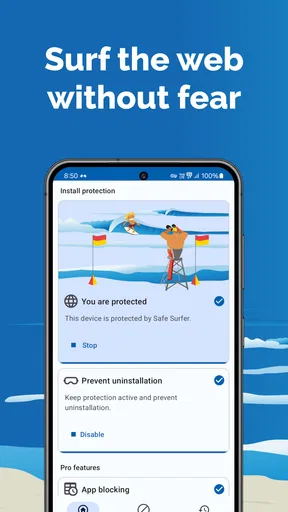
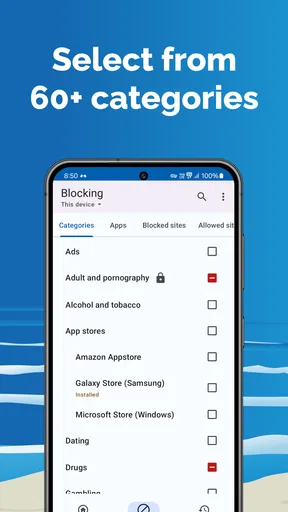
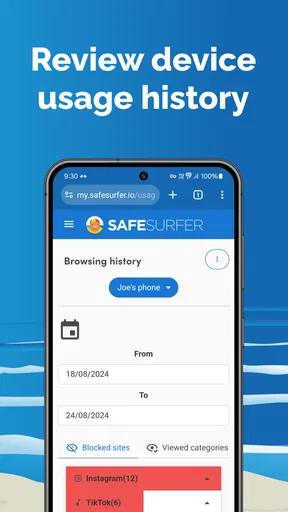
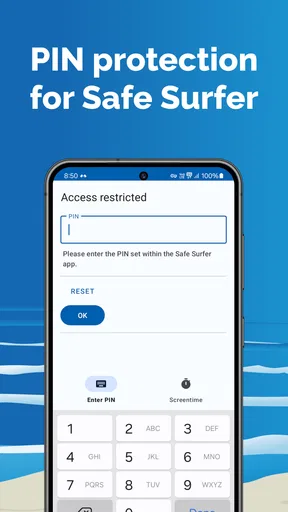
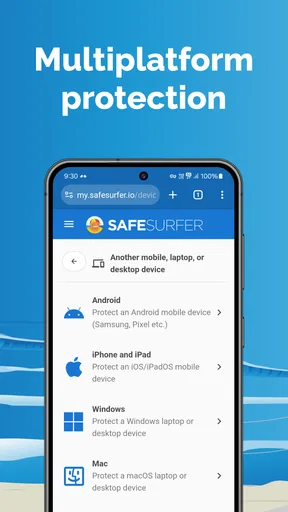
 Analysis by AppCompare
Safe Surfer makes its strongest impression in the first few days, when setting a boundary feels like a fresh start. I can see the appeal: instead of relying entirely on willpower, you add a practical layer between yourself and content or apps you would rather avoid. The more useful question, though, is whether that layer still helps once the novelty wears off and everyday routines return.
A useful first step, not a complete solution
As a parenting app from Safe Surfer, it is aimed at families who want more control over what a device can access, as well as adults trying to change their own online habits. It is free to install, with optional in-app purchases ranging from $1.49 to $5.49 per item. Its Everyone content rating makes the app broadly accessible, though the settings and conversations around online boundaries still need to fit the person using the device.
For a parent, the most productive approach is to decide on a small, clear goal before changing settings: perhaps limiting access to particular apps or reducing exposure to unsuitable web content. For personal use, it can help to identify the specific moments that tend to lead to unwanted browsing. A blocker is more useful when it supports a deliberate plan than when it is installed as a vague promise to “use the phone less.”
Where it fits among alternatives
Safe Surfer combines web filtering and app blocking in one place, which is more convenient than trying to handle each concern separately. A browser’s own restrictions may be enough for someone who only wants to limit web content, while built-in device controls may suit a household focused mainly on screen time or app access. I would choose Safe Surfer when the combination matters; I would not add another layer just because more controls sound automatically better.
That distinction matters for families sharing responsibility. A technical filter can reduce unwanted exposure, but it does not explain why a site is blocked or help a child decide what to do when something upsetting appears elsewhere. I would treat the app as one part of a household agreement, not as a substitute for talking about safe browsing, privacy, and what to do when a boundary does not work as expected.
Making it useful beyond the first week
The app’s lasting value depends on occasional, thoughtful maintenance. I would review whether the chosen restrictions still match the household’s needs, and whether a legitimate site or app is being caught by a rule that is too broad. Whitelisting can help in that situation, but I would use it sparingly: adding exceptions without a clear reason can gradually weaken the boundary the filter was meant to create.
One practical routine is to check in after a change rather than adjusting several things at once. If a child needs a blocked resource for school, for example, identify the exact access problem and make a narrow exception if appropriate; then revisit it when the need has passed. For an adult trying to curb a recurring habit, it can help to notice when the restriction is doing useful work and when a different routine—such as putting the phone away during a vulnerable part of the day—is needed too.
Worth Reading Before You Choose

EA SPORTS FC Mobile 26 Is a Bigger Football Game, but It Takes Time

Flipboard Shows What News Apps Must Do Beyond the Feed

Switching to Android Auto Means Rethinking Your Driving Routine

Google Calendar Makes a Crowded Week Easier to Manage

Ludo King Makes the Most of the Minutes Between Plans

Baby Panda World Brings Quick Play to Modern Phones, but Its Game Library Feels Busy
What can become tiring
Filtering is never the same as perfect judgment. A site may be blocked when it is harmless, or unsuitable material may appear through a route the filter does not catch. That means the app should not be treated as a guarantee, especially on a child’s device. If a restriction interferes with an ordinary task, the friction can also tempt people to switch the protection off altogether, so rules that are realistic are more likely to last.
There is a second kind of fatigue: repeatedly managing restrictions can turn a family conversation into a series of technical disputes. I would keep the rules easy to explain and avoid presenting a block as proof that a child has done something wrong. For adults, the equivalent risk is expecting an app to solve a habit on its own. It can add friction, but a useful long-term routine still depends on the choices and alternatives around phone use.
Ever find yourself endlessly scrolling through your phone, only to realize that you’ve wandered into the depths of the internet where you really didn’t want to go? Yeah, been there, done that. That's why I decided to check out Safe Surfer: Block Porn & Apps. It's supposed to be that trusty sidekick we all need, keeping our digital lives a bit more, well, safe.
Setting It Up
First things first, getting Safe Surfer: Block Porn & Apps up and running was a breeze. The installation process was quick, and the app didn’t demand any weird permissions that made me raise an eyebrow. Once you're in, the app’s interface is super intuitive. It’s like having a friendly guide showing you how to navigate through its features.
What I really appreciated was that it doesn’t just block unwanted content but also gives you a decent level of customization. You can tweak settings to suit your preferences, which means it’s not a one-size-fits-all solution. Instead, it adapts to what you need. It's like having a digital bouncer, only way less intimidating and more user-friendly.
Features That Stand Out
So, what does this app really bring to the table? Let’s dive into some of the features that caught my attention.
- Content Filtering: This is the heart of the app. It’s designed to block pornographic content effectively. Whether you're browsing for work or play, you can rest easy knowing that unwanted content won’t sneak its way onto your screen.
- App Blocking: Not only does it filter web content, but it also allows you to block specific apps. This is super handy for parents wanting to keep certain apps off their kids’ devices.
- Custom Whitelisting: Sometimes, you just need access to a specific site that might be blocked by default. The app allows you to whitelist sites, which is a neat feature for those occasions when you need a bit more control.
- Usage Monitoring: This feature lets you keep track of your online activity. It’s a good way to become more aware of your digital habits and maybe even reign them in if you’re spending too much time scrolling.
Performance and Usability
In terms of performance, Safe Surfer runs smoothly in the background without slowing down your device. I’ve had apps in the past that felt like they were dragging my phone into the Stone Age, but thankfully, this isn’t one of them. It’s light on resources and doesn’t interfere with other apps, which is always a win in my book.
Usability-wise, it’s straightforward. Even if you’re not the most tech-savvy person, navigating through the app is a piece of cake. The settings are clearly labeled, and its overall design is clean and clutter-free. It’s like having a tiny digital assistant that’s always on standby.
Who Will Benefit Most?
This app is a solid choice for anyone concerned about online safety. But it’s particularly great for parents looking to protect their kids from inappropriate content. It offers peace of mind knowing that you have some level of control over what’s accessible on devices.
On the flip side, it’s also useful for adults who want to avoid distractions or keep their browsing habits in check. It’s not just about blocking what’s harmful but also about promoting healthier digital habits overall.
Living with it month to month
Safe Surfer has an average rating of 3.8 from around five thousand ratings, and it has passed half a million installs. Those figures suggest that it has found an audience, but they do not tell me whether its boundaries suit a particular family. I would use them as context, then judge the app by whether its filtering and app controls remain helpful in the routines that matter at home.
The current version is 3.8.14, and the app supports Android 5.1 and later. That makes device compatibility worth checking before a household builds a routine around it, especially if a child uses an older phone. Safe Surfer was released on February 15, 2017, so it has been around long enough to be an established option rather than a brand-new experiment.
A realistic everyday case might be a child using a phone for homework in the afternoon and entertainment later. I would avoid changing restrictions right in the middle of a study session: first identify any school-related site that needs access, then test that the arrangement works for the child’s normal tasks. Afterward, a brief family check-in can reveal whether a block is preventing a genuine problem or simply making ordinary use frustrating. That small loop—set, observe, adjust—is more sustainable than repeatedly tightening controls in reaction to a single incident.
Who should choose another approach
I would skip this app if the main need is a detailed family dashboard, a complete time-management system, or a guarantee that every unsafe page will be stopped. Safe Surfer’s appeal is its mix of content filtering and app blocking, not a promise to supervise every part of a child’s digital life. A family that primarily needs device-wide schedules may be better served by the controls already built into its phones, while someone concerned only about one browser could prefer a simpler browser-level restriction.
It may also be the wrong fit when the person using the device does not agree with the restrictions and can simply move to another device or connection. In that case, the technical boundary may offer less lasting value than a shared plan and direct conversation. For an adult, the same principle applies: if blocking one route just leads to another, pair the restriction with a concrete replacement habit, such as leaving the phone outside the bedroom or choosing a non-screen activity during a difficult stretch.
Parents may reasonably wonder whether they can rely on it without checking in. I would not. A filter is a helpful layer, but it cannot replace age-appropriate conversations or occasional checks that everyday browsing still works. Adults may ask whether it can replace self-discipline; I see it as support for a decision, not a substitute for one. And if a site is mistakenly restricted, whitelisting offers a way to make a targeted exception, though the household should agree on why that exception is being made.
For anyone weighing the ongoing cost, the basic app is free and some in-app purchases are available. I would start with the free experience and only consider a paid item if it addresses a specific need that becomes clear in normal use. That avoids paying for extra control before knowing whether the app’s approach fits your family or personal routine.
Final Thoughts
When it comes to keeping your online experience safe and distraction-free, Safe Surfer does a commendable job. It’s easy to use, packed with useful features, and doesn’t get in the way of your device’s performance. It’s like having a digital guardian, making sure you only see what you really want to see.
If you’re in the market for an app that offers both protection and flexibility, give Safe Surfer a try. It might just be the digital safety net you didn’t know you needed. For me, it earns lasting space when I treat it as a modest, adjustable aid: useful enough to keep around when its rules remain relevant, but not something I would install and forget. Its real test is whether it supports better habits without turning daily phone use into constant troubleshooting.
Pros
- Easy-to-use interface for all ages.
- Blocks inappropriate content effectively.
- Customizable filtering options.
- Supports multiple devices seamlessly.
- Minimal impact on device performance.
Cons
- Some features require premium purchase.
- Occasional false positives in blocking.
- Limited support for non-English sites.
- UI design feels a bit outdated.
- Setup can be complex for novices.
FAQs for Safe Surfer: Block Porn & Apps
What is Safe Surfer and how does it work?
Safe Surfer is a digital safety application designed to block inappropriate content, such as adult websites and explicit apps, to ensure a safer online experience. It works by using advanced filtering techniques to detect and block harmful content across all your devices, providing peace of mind for parents and individuals seeking a secure browsing environment.
Is Safe Surfer compatible with all devices and platforms?
Safe Surfer is available for both Android and iOS devices, ensuring broad compatibility across smartphones and tablets. It supports various operating systems, providing flexibility for users who switch between different platforms. The application is designed to integrate seamlessly with your device, ensuring minimal disruption to your normal usage.
Does Safe Surfer affect internet speed or device performance?
Safe Surfer is optimized to have minimal impact on your internet speed and device performance. While it works in the background to block inappropriate content, the app is designed to be lightweight and efficient, ensuring that your browsing experience remains smooth and uninterrupted.
Is it possible to customize the filtering options in Safe Surfer?
Yes, Safe Surfer offers customizable filtering options, allowing users to tailor the level of protection to their specific needs. You can adjust settings to block specific categories of content or whitelist certain websites, providing a personalized and flexible online safety solution suitable for both families and individuals.
How does Safe Surfer ensure user privacy and data security?
Safe Surfer prioritizes user privacy by employing strong encryption methods to protect data without collecting personal browsing information. The app ensures that your online activities remain private, as it does not store or share your data with third parties, aligning with best practices for digital security and privacy.


